Desktop:ThinkPad
From RadonWiki
Windows 10 Reset on 2018-05-26 - Deleted Files and Apps
Fresh Installs
Chrome - Version 66.0.3359.181 (Official Build) (64-bit)
KeePass 2.39.1 - then restore files below
Eset NOD32 Antivirus
MS Office 2016 (Word, Excel, Outlook Etc) -  Install from Office 365 (user: matt.carter@bdo.co.nz)
G Suite Sync for Microsoft Outlook - (version 4.0.9.0)
PuTTY - 32 Bit version 0.7 (Don't need 64 Bit)
Greenshot (Greenshot-RELEASE-1.2.10.6)
Restore Files
Map Network Drives to NAS (M:=\\radonnas\Multimedia, H:=\\radonnas\homes\Matt) - User:Admin
KeePass Database and Key (MCARTER.bkdx MCARTER.key)
Run G Suite Sync and link to Outlook creating a new profile
Restore MYOB EXO Employee Services
Copy directory C:\_COMACC
Run File network
Install Quickbooks 2008/09 SP3
Install Visual C++ Redistributables
===================================
C++ 2005 SP1 (x86) - https://www.microsoft.com/en-us/download/confirmation.aspx?id=5638
C++ 2008 (x86) - https://www.microsoft.com/en-nz/download/confirmation.aspx?id=29
C++ 2013 (x86) - https://www.microsoft.com/en-nz/download/details.aspx?id=40784
Apply Registry Fix - regfix_QB_Win10.reg
Restart Computer
Mount Image QB0809_SP3.iso
Run autorun.exe
...License Key: 85301-26735-37644-220162
...Install Quickbooks with the Company File Server
...Installs .NET 1.1
Run QuickBooks
...Select General Business
...Open an Existing Company File
...Activate Customer ID: 1247912
Install WAMP DEV Environment
SSH Publio/Private Key added to GIT Server
  ssh-keygen –t rsa –C "matt.carter@radon.nz"
  Accept default name, and enter your own pass phrase
  This creates two files in folder ~/.ssh/
    id_rsa (private Key)
    id_rsa.pub (public key)
  id_rsa.pub copied to the gitolite-admin respository on the server as keydir/<username>.pub
WAMP - wampserver3.1.3_x86 (have to install all the prerequisite VC distributables both 32 and 64 bit)
NetBeans 8.2 64 Bit with PHP http://download.netbeans.org/netbeans/8.2/final/bundles/netbeans-8.2-php-windows-x64.exe
Clone GIT Respository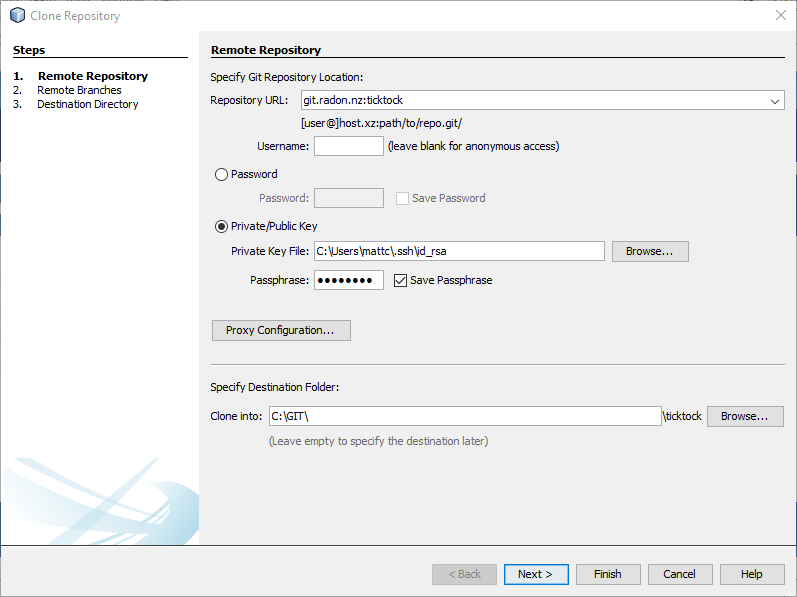

Configure Web Server
  Edit hosts file (C:\Windows\System32\drivers\etc\hosts) and add line "127.0.0.1 ticktock"
  Edit httpd-vhosts.conf file (within wampserver) and add the following Virtual Host
<VirtualHost ticktock:80>
  ServerName ticktock
  ServerAlias ticktock
  DocumentRoot "C:/GIT/ticktock/app/webroot"
  <Directory "C:/GIT/ticktock/app/webroot">
    Options +Indexes +Includes +FollowSymLinks +MultiViews
    AllowOverride All
    Require local
  </Directory>
</VirtualHost>